ⓘWritten and reviewed per our independent editorial methodology.
If you are holding a physical check and wondering how to move that money onto your phone, you are definitely not alone. Mobile deposits have changed the way we bank. Figuring out how to cash a check on Cash App is one of the most common questions we see from users relying on the platform for their daily spending.
We tested the feature thoroughly to see just how easy it is to skip the bank line. Our take after testing is that it works seamlessly, provided your account meets a few strict requirements. If you do not have an established account, you might hit a roadblock.
In this guide, we break down exactly how to cash a check on Cash App. We will cover who gets access, the step-by-step process, and what you can do if the feature is missing from your screen. Let us get into the details.
Wondering how to cash a check on Cash App? It requires you to have an activated physical or virtual card, plus a history of qualifying direct deposits. Once eligible, the process takes less than a minute directly through the mobile app.
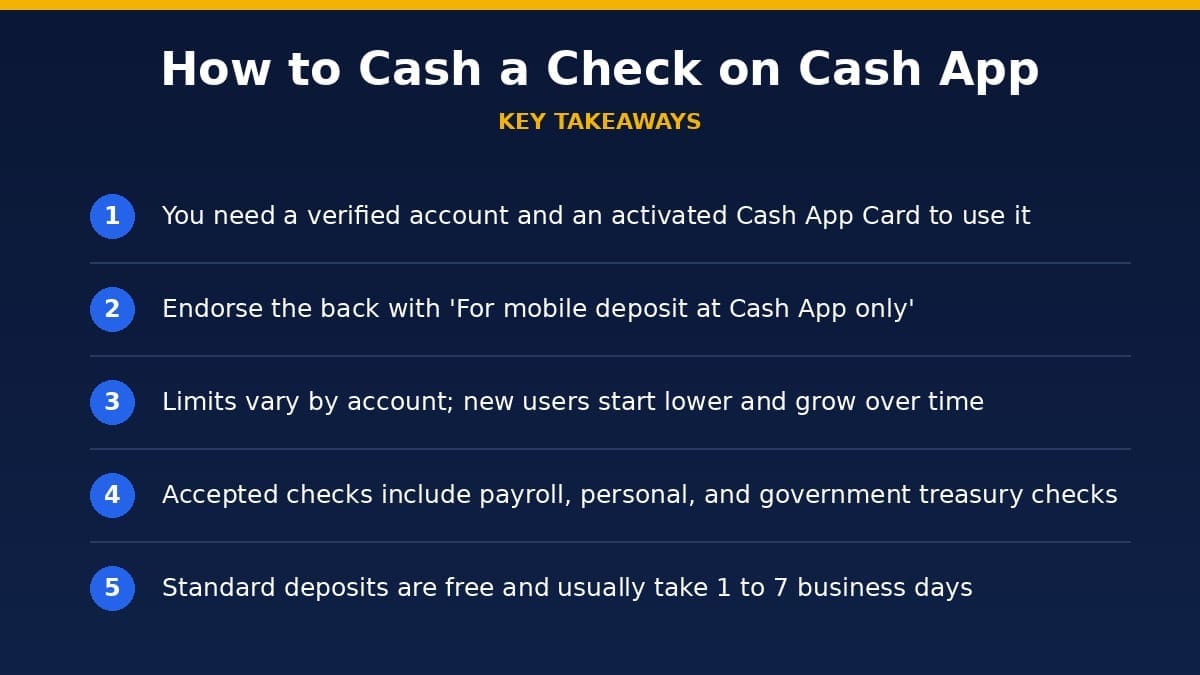
- You need a verified account and an activated Cash App Card to use the feature.
- Endorse the back specifically with ‘For mobile deposit at Cash App only’.
- Limits vary by account history, so there is no single fixed figure.
- Accepted checks include payroll, personal, and government treasury checks.
- Processing is free and usually takes 1 to 7 business days.
Table of Contents
How to Cash a Check on Cash App at a Glance
| Fee | $0 |
| Eligibility | Active card & verified account |
| Where to find it | Money Tab > Mobile Check Deposit |
| Accepted checks | Payroll, treasury, personal |
| Deposit limit | Varies by account (no fixed published limit) |
| Processing time | 1-7 business days |
Understanding Mobile Check Deposit on Cash App
Not everyone can immediately open the app and take a picture of a check. Before learning how to cash a check on Cash App, you have to understand the platform’s gated approach. They do not just give this feature to brand-new, unverified accounts.
Cash App restricts mobile check deposits to users who have proven they actually use the app for regular banking. It is a security measure designed to prevent fraud. They want to see that you are a verified user with a trusted footprint.
Are You Eligible?
The biggest hurdle when figuring out how to cash a check on Cash App is getting access to the feature. You must have an activated Cash App Card. This Visa debit card is issued by Sutton Bank and can be either physical or virtual.
Secondly, you must have a recent qualifying paycheck or direct deposit history. This usually means a direct deposit within the last 30 to 60 days. If the algorithm detects these conditions, the feature magically unlocks.
If you lack these requirements, the feature simply will not show up. You cannot force it to appear. You can learn more about general account verification in our Cash App review.
Step-by-Step: How to Cash a Check on Cash App
If you have met the account requirements, the actual process is incredibly straightforward. It took us less than a minute during our testing.
Here is the exact step-by-step breakdown of how to cash a check on Cash App. Follow these instructions carefully so your deposit does not get rejected.
Step 1: Prep Your Endorsement
The most critical step in how to cash a check on Cash App is the endorsement. You must flip the check over and sign your name on the back.
Immediately underneath your signature, you are required to write: “For mobile deposit at Cash App only.” If you miss this exact phrase, the app is highly likely to reject your check. This ensures the check cannot be physically cashed elsewhere.
Step 2: Navigate to the Money Tab
Open your Cash App and look at the bottom left corner. Tap the “Money” tab. This is where your current balance is displayed.
Scroll down to the Banking section. If your account is eligible, you will clearly see an option labeled “Mobile Check Deposit.” Tap that button to begin.
Step 3: Set the Stage for Photos
Now, you need to capture the check. We found that lighting makes a huge difference. Place your endorsed check on a dark, flat, and uncluttered surface.
Ensure there are no shadows falling across the crucial details of the check. The account numbers at the bottom (the MICR line) must be perfectly legible.
Step 4: Snap the Front and Back
Follow the on-screen prompts to capture a clear photo of the front of the check. The app will usually auto-capture once it detects the edges cleanly.
Next, flip it over. Take a clear photo of the back. Verify that your signature and the required endorsement text are perfectly visible in the image.
Step 5: Enter the Exact Amount
After accepting the photos, the app will prompt you for the dollar amount. Input the exact dollar amount written on the check. A mismatch here is a guaranteed way to see a rejection.
Review the details one last time. Tap “Submit” to send the check off for processing.
What Kind of Checks Does Cash App Accept?
When figuring out how to cash a check on Cash App, you have to know what types of paper they actually process. They do not accept everything. Their policies align closely with standard U.S. mobile deposit rules, similar to those enforced by the Federal Reserve.
The Approved List
Cash App readily accepts standard payroll checks. If your employer still hands out physical checks, you are good to go.
They also accept government and treasury checks. This includes tax refunds or stimulus payments. You can generally deposit standard personal checks written out specifically to you as well.
What Gets Rejected?
They have a strict “no” list. Cash App will not accept traveler’s checks or savings bonds.
You cannot deposit third-party checks. If a check is made out to someone else who endorsed it over to you, Cash App will reject it. They also refuse money orders, foreign bank checks, or checks that have visible alterations.
Limits, Fees, and Timelines
Knowing how to cash a check on Cash App is only part of the battle. You also have to navigate their limits and timelines. Thankfully, there are no hidden fees here.
- Deposit Limits You Need to Know. Like all mobile banking tools, limits apply. Cash App does not publish a fixed limit, so your cap depends on your account history and activity. Newer accounts tend to start with lower caps that rise as you build a positive deposit history.Cash App may also apply rolling caps over multi-day windows, and these depend on your account rather than a published number. Checks must also be dated within the last 180 days.
- Does It Cost Anything?. One of the best perks about how to cash a check on Cash App is the price tag. It is completely free. There are no processing fees for standard standard checks. You get to keep exactly what is written on the check.
- How Long It Actually Takes. When we tested this, our funds were available in about two business days. The official timeline states that money typically arrives in 1 to 7 business days. In rare edge cases, it can take up to 6 or 8 business days for the funds to clear completely. This is not an instant process. If you need money this very second, mobile check deposit is rarely the best route.
Why You Might Not See the Feature
If you don’t see the mobile check deposit option, it simply means your account hasn’t met the direct deposit requirements yet.
One of the most frustrating parts of learning how to cash a check on Cash App is opening the Money tab and seeing… nothing. This is a common complaint.
If the button is missing, you simply do not meet the criteria. The app dynamically hides features from accounts it deeps ineligible.
- Missing Eligibility Requirements. The primary culprit is a lack of direct deposit history. If you only use Cash App to send $20 to friends for pizza, the system does not view you as a regular banking customer. You also need an active Cash App Card. Since the card is issued by Sutton Bank, this formally integrates you into their broader banking ecosystem. Read more about their safety in our guide on Is Cash App Safe and Legit.
- Account Flags and Restrictions. Sometimes, even verified users lose access. If your account has been flagged for suspicious activity, Cash App will quickly pull the mobile deposit feature. Similarly, if your account is largely dormant, the feature might vanish. They prioritize active, daily users.
- How to Unlock the Feature. If you want to know how to cash a check on Cash App but lack the button, start by ordering the free Cash App Card. Activate it the second it arrives in the mail. Next, set up a qualifying direct deposit. Route your next paycheck into your Cash App account. Within a month or two, the mobile deposit feature should appear organically. If you run into linkage issues, consult our guide on Why Cash App Won’t Link Your Bank.
What to Do Once the Money Clears
Congratulations, you have masterfully handled how to cash a check on Cash App. Now that the funds are sitting in your balance, what are your options?
Spend or Withdraw
You can immediately spend the funds using your Cash App Card anywhere Visa is accepted. If you want hard cash, you can visit an ATM.
Keep in mind that ATM fees might apply unless you meet specific direct deposit requirements. We break this down completely in Are Cash App ATM Withdrawals Free.
Pay Your Bills
Many users rely on Cash App as their primary checking account alternative. You can use your routing and account numbers to settle utilities or rent.
We tested this extensively. It works perfectly for most standard ACH withdrawals. Check out our guide on How to Pay Bills With Cash App to see the exact setup steps.
Earn Interest with Savings
Cash App offers Cash App Savings, which is a real, balance-based savings feature. The base rate is 1.5% APY if you have the Cash App Card.
However, you can earn up to 3.25% APY with Cash App Green. This requires $500 or more in monthly card spend or qualifying direct deposits. This makes holding your cleared check funds in the app much more attractive.
Borrowing Limits
Once you are an established user with direct deposits, you might unlock the Borrow feature. Cash App allows eligible users to borrow up to $500.
Keep in mind, there is no SpotMe-style free overdraft like you find with Chime. If you lack funds, the transaction simply declines. To see how Cash App stacks up against its biggest rival, read Cash App vs Venmo.
Troubleshooting Failed Deposits
Sometimes, despite knowing exactly how to cash a check on Cash App, the app rejects your submission. Do not panic. The reasons are usually simple to fix.
- Blurry Photos and Bad Lighting. The number one reason for rejection is user error with the camera. If your lens is smudged, clean it. If the app cannot read the magnetic ink character recognition (MICR) line at the bottom of the check digitally, it will autodecline. Find better lighting and try again.
- Endorsement Mistakes. If you just signed your name and forgot the required phrase, the deposit will fail. You must write “For mobile deposit at Cash App only.” If you already took the picture without it, write it in, retake the photo of the back, and resubmit. The reviewing bank requires this extra layer of security.
- Stale Checks. Banks, including Sutton Bank (which issues the Cash App Card), generally refuse checks older than six months. This is an industry standard verified by the FDIC. If the check is over 180 days old, it is considered stale. You will need to contact the person or business who wrote it and ask for a freshly dated replacement.
Is Cash App the Best for Checks?
If you know how to cash a check on Cash App, you might wonder if it is the best tool available. For everyday users securely linked to the ecosystem, it is highly convenient.
The Convenience Factor
It saves you a trip to a brick-and-mortar branch. You can do it from your couch.
Because Cash App is free to download and the check feature has zero fees, it is highly competitive with traditional banking apps.
The Limits Factor
However, if you routinely handle large checks, Cash App might frustrate you. These caps can be lower than what legacy institutions offer, especially for newer accounts.
If you sell a used car for $8,000 and the buyer pays via check, Cash App cannot handle it. In those scenarios, a traditional checking account is mandatory.
Final Wrap-Up
Learning how to cash a check on Cash App is a massive shortcut for managing your money.
Our take after testing is clear: while the strict eligibility rules can be annoying for temporary users, the actual process is flawless.
If you do not see the mobile check deposit option, it simply means your account has not met the direct deposit requirements yet.
Once you cross that threshold, Cash App transitions from a simple peer-to-peer sending app into a genuinely useful mobile banking hub. Just remember to endorse the back correctly, find some good lighting, and you will be depositing checks like a pro.